
Compass helps you find a doctor, lawyer, professional, tutor, or store that speaks your language. The directory features specialists, organizations, and stores across Europe who are willing to communicate with clients in Russian, Ukrainian, Kazakh, Armenian, Georgian, English, and other languages. If for some reason you don't see your preferred language here, let us know, and we'll add it and expand our reach to those in need.
Kompas's key feature is its language-based search. You choose not only the service and location, but also the language you're most comfortable using to explain your needs.
The artist writes the description in their own language, and you read it in the website's language: Kompas translates it. The original is always available with one click.
You can search and view cards without registration. Compass is free to use.

Hi! I'm Brutto, a suitcase with experience moving. I have a lot of stuff, and a lot of problems. But with a compass, I always find my people. Come on, I'll show you how.
1. Quick start: search from the main page
The search starts right on the main page. Just three steps.
- In the search field, write who or what you need: “dentist”, “document translation”, “car service”.
- Select the languages you are comfortable communicating in. You can select multiple.
- Select your country or region and click "Find".
For example, if you need a dentist in the Bratislava region who speaks Russian, type "dentist," select "Russian," select the region, and click "Find." The compass will show matching suggestions.
You can skip any step. Without search words, you'll see all artists in the selected languages; without a language, you'll see all artists in the selected region.
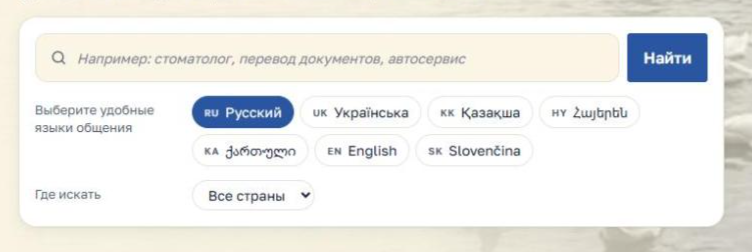

That's how I found a dentist who speaks my mind. The tooth was fixed. But no one has yet come to reattach the handle.
2. Search methods
You can search in different ways: start with what you know for sure and refine it using filters.
By words. If you know who you're looking for, type it in the search box: "lawyer," "electrician," "psychologist," "English tutor." You can describe the task: "washing machine repair," "document translation." If you can't find what you're looking for, try a different word: "attorney" instead of "lawyer," "master" instead of "plumber."
By Group. If you don't know the name of the specialist you need, open "All Offers" or click on the group on the main page. Offers are divided into 11 groups: Health, Real Estate, Household Services, Transportation, Training, Consulting and Support, Pets, Children's Services, Sports and Beauty, Business, and Other Services.
Within the group, there are subgroups. For example, in "Health," there's a separate group for dentists.
By location. Select a country and region. You can also enter a city or address in the directory: Compass will show nearby contractors. Keep in mind that many contractors work outside their home city: the profile lists the regions where the contractor accepts orders.
By language spoken. Check all the languages you're comfortable speaking. If you're fluent in Russian and English, check both to find more suitable performers.
By type of activity. In the directory, you can choose who you're looking for: an organization, an individual, or a specialist working for an organization.
All filters work together. For example: "lawyer" + your region + Russian language. The more specific your search, the shorter and more useful the list.
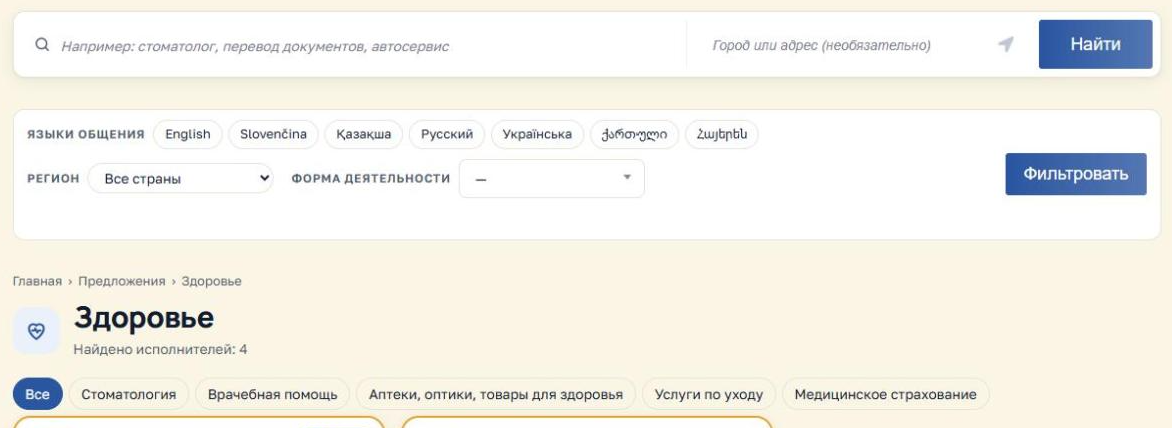
The arrow will always find north. And the filter of language will find someone who will understand you.
3. How to choose a performer
After searching, you'll see a list of offers. Each preview shows the main points:
- subgroup and title of the proposal, name of the performer or name of the organization;
- city;
- languages of communication - letter codes: RU, UK, KK, HY, KA, EN, SK;
- average rating and number of reviews, if any;
- date of posting and the "New" tag for those who are new to Compass.
The list starts with the performers with the best ratings and newcomers, then the rest.
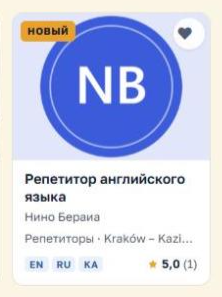
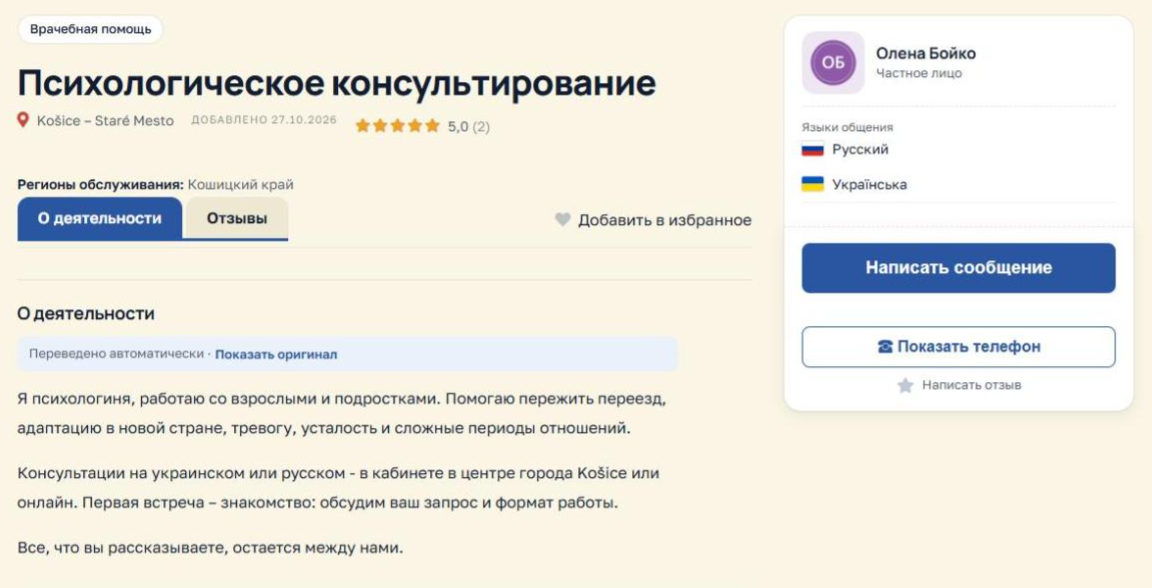
Click on the preview to open the offer page. It includes:
- detailed description of activities and photographs;
- services or goods with prices - from providers on the "Vizitka Plus" and "Prof" tariffs;
- languages spoken with flags, address and map, service regions;
- links to the performer’s website and social networks;
- Reviews from other buyers.
Translation and original. If the description is written in another language, Kompas translates it automatically. This text is marked "Automatically translated." Click "Show original" to see the artist's text. If there is no translation, click "Translate."
What to look for when choosing:
- Is the specialization suitable for your task?
- Is there a language convenient for you among the performer's languages?
- Does the performer work in your region?
- What people write in reviews is not only the rating, but also the text itself.
Don't rush to choose based on a single rating. Detailed descriptions and meaningful reviews often speak louder than star ratings.
If you navigate from a list to a card, the "Return to search" button will return you to the same list with the same filters.
4. How to contact the contractor
You can send a message to any contractor directly on the website—you'll need to log in to your account. There may be several other contact methods available on the offer page.
- "Send a message" — the message is sent to the performer's account and email. The performer won't see your email address.
- "Show phone" - if the performer has specified a phone number.
- Website and social media — icons under the communication languages: Facebook, Instagram, Telegram, YouTube, LinkedIn, and the artist's website.
To help the contractor quickly understand what you need, please write in your first message:
- what exactly is required;
- where are you;
- when the service is needed;
- What language are you comfortable communicating in?
The contractor's response will be sent to the Buyer's Account, and an email with a link to the correspondence will be sent to your email address.
What else do you need to know? Some freelancers receive a copy of your Telegram messages and reply from there; the reply will still appear on the website. Freelancers on the "Pro" plan can receive messages in their customer management system (CRM). In this case, there will be a checkbox under the message form: if you check it, the freelancer will receive your name and email address so they can contact you directly. Checking this box is optional. For more information, see the Privacy Policy .
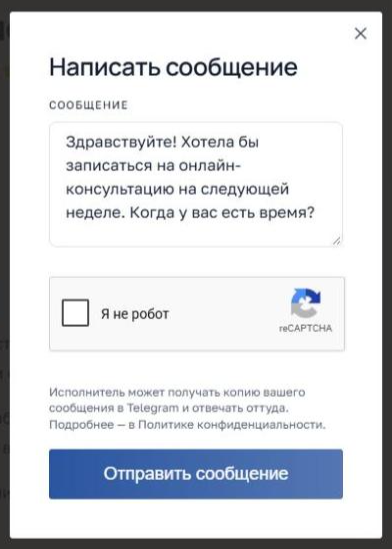

Write it as it is: what's broken, where you are, and when it's convenient. Your friends will understand you with half a word, but a full sentence is better.
5. Why register and how
You can search and read cards without registering. An account is required to communicate with performers and save your findings. Once logged in, you can:
- write to performers and receive responses in the “Buyer’s Account”;
- add artists to your Favorites and return to them later;
- leave reviews and ratings;
- Write to Kompas technical support from your personal account.
The "Recently Viewed" block on the homepage works without registration: the list is stored only in your browser.
How to register:
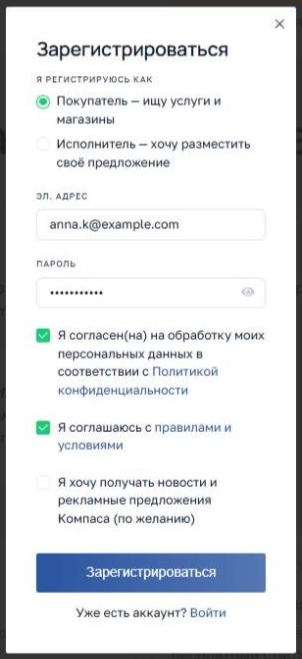
- Click "Login/Register" in the upper right corner.
- Select "Register".
- Select "Buyer." If you also provide services, select "Contractor"—you will always be the buyer.
- Enter your email address and create a password. This email will serve as your login.
- Please confirm your consent to the Site Rules and the processing of your personal data. This is mandatory.
- Subscribing to Kompas news is optional; you don't have to check the box.
- Click "Register".
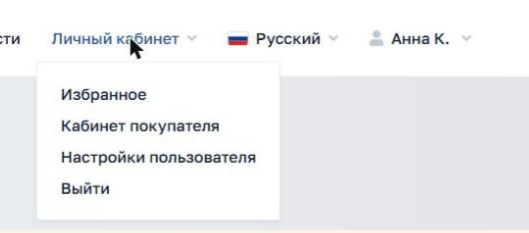
After logging in, everything you need is in your "Personal Account": "Favorites," "Buyer Account" with your correspondence, and "User Settings," where you can change your name, email, and password. The "Contact Technical Support" button is located under the account menu and in the footer of the website.
If you decide to offer your services later, click "Become a performer": no new account is required.
6. Leave reviews
Your review helps others choose and shows the contractor what worked and what didn't. Any registered user can leave a review.
- Open the offer page.
- Click "Write a review".
- Rate it from 1 to 5 and write a few sentences.
One person leaves one review for one performer, but it can be edited later. The review appears immediately.
To make your review helpful, please write:
- what you ordered and how it was made;
- was it convenient to communicate;
- were deadlines and agreements met;
- Were the expectations met?
Please write honestly and politely. Rude and offensive reviews violate the Site Rules and will be deleted.
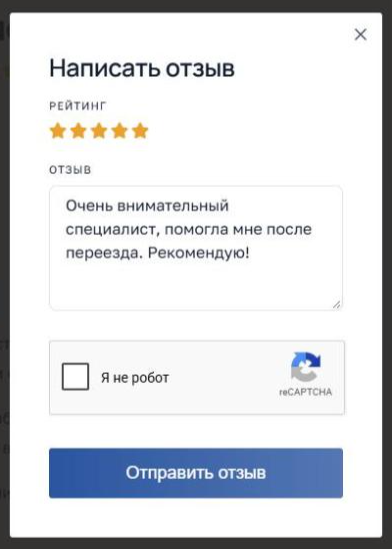
A review is like a sticker on a suitcase: it tells you where you've been and what it was like there.
7. Helpful Tips
- Try different words: “lawyer” and “jurist”, “master” and “electrician” may give different results.
- If there are few offers in your region, choose the entire country: many performers work remotely or travel.
- Mark all the languages you are comfortable speaking.
- Compare not only ratings, but also descriptions and reviews.
- Save your favorite artists to your Favorites.
- If you find an error in the card or a violation, click "Report" on the proposal page.
- After the service, please leave a review.
Compass grows with you. If you know a good specialist who isn't here yet, tell them about Compass: adding a profile is free.
Compass - your own are nearby.
Home is far away, but my family is close by. I and my 23 kilograms have proven this.
Компас помогает найти врача, юриста, мастера, репетитора или магазин, где вас поймут на вашем языке. В каталоге собраны специалисты, организации и магазины в странах Европы, которые готовы общаться с клиентами на русском, украинском, казахском, армянском, грузинском, английском и других языках. Если по какой-то причине вы не нашли здесь привычный вам язык общения — дайте нам знать, мы добавим его и увеличим охват нуждающихся в таких контактах.
Главное отличие Компаса — поиск по языку общения. Вы выбираете не только услугу и место, но и язык, на котором вам удобно объяснить свою задачу.
Исполнитель пишет описание на своём языке, а вы читаете его на языке сайта: перевод делает Компас. Оригинал всегда можно открыть одним нажатием.
Искать и смотреть карточки можно без регистрации. Пользоваться Компасом бесплатно.
Привет! Я Брутто, чемодан с опытом переездов. Вещей во мне много, проблем тоже. Но с компасом я всегда нахожу своих. Пойдём, покажу как.
1. Быстрый старт: поиск с главной страницы
Поиск начинается прямо на главной странице. Достаточно трёх шагов.
- В поле поиска напишите, кто или что вам нужно: «стоматолог», «перевод документов», «автосервис».
- Отметьте языки, на которых вам удобно общаться. Можно выбрать несколько.
- Выберите страну или регион и нажмите «Найти».
Например, нужен стоматолог в Братиславском крае, который говорит по-русски. Напишите «стоматолог», отметьте «Русский», выберите регион и нажмите «Найти». Компас покажет подходящие предложения.
Любой шаг можно пропустить. Без слов поиска вы увидите всех исполнителей на выбранных языках, без языка — всех в выбранном регионе.
Я так нашёл стоматолога, который говорит по-моему. Зуб вылечили. А вот ручку пришить пока некому.
2. Способы поиска
Искать можно по-разному: начните с того, что вы знаете точно, и уточняйте фильтрами.
По словам. Если вы знаете, кто нужен, напишите это в поле поиска: «юрист», «электрик», «психолог», «репетитор английского». Можно описать задачу: «ремонт стиральной машины», «перевод документов». Не нашлось — попробуйте другое слово: «адвокат» вместо «юрист», «мастер» вместо «сантехник».
По группам. Если вы не знаете, как называется нужный специалист, откройте «Все предложения» или нажмите на группу на главной. Предложения разделены на 11 групп: Здоровье, Недвижимость, Бытовые услуги, Автотранспорт, Обучение, Консультация и поддержка, Домашним питомцам, Для детей, Спорт и красота, Бизнес, Прочие услуги.
Внутри группы есть подгруппы. Например, в «Здоровье» отдельно собраны стоматологи.
По месту. Выберите страну и регион. В каталоге можно также написать город или адрес: Компас покажет исполнителей поблизости. Учтите, что многие работают не только в своём городе: в карточке указаны регионы, где исполнитель принимает заказы.
По языку общения. Отметьте все языки, на которых вам удобно говорить. Если вы свободно говорите по-русски и по-английски, отметьте оба: подходящих исполнителей станет больше.
По форме деятельности. В каталоге можно выбрать, кого вы ищете: организацию, частное лицо или специалиста, который работает в организации.
Все фильтры работают вместе. Например: «юрист» + ваш регион + русский язык. Чем точнее запрос, тем короче и полезнее список.
Стрелка всегда найдёт север. А фильтр языка — того, кто тебя поймёт.
3. Как выбрать исполнителя
После поиска вы увидите список предложений. В превью каждого показано главное:
- подгруппа и название предложения, имя исполнителя или название организации;
- город;
- языки общения — буквенными кодами: RU, UK, KK, HY, KA, EN, SK;
- средняя оценка и число отзывов, если они есть;
- дата размещения и метка «Новый» у тех, кто недавно на Компасе.
Сначала в списке идут исполнители с лучшими оценками и новички, затем остальные.
Нажмите на превью, чтобы открыть страницу предложения. На ней есть:
- подробное описание деятельности и фотографии;
- услуги или товары с ценами — у исполнителей на тарифах «Визитка плюс» и «Проф»;
- языки общения с флагами, адрес и карта, регионы обслуживания;
- ссылки на сайт и соцсети исполнителя;
- отзывы других покупателей.
Перевод и оригинал. Если описание написано на другом языке, Компас переводит его автоматически. Над таким текстом стоит пометка «Переведено автоматически». Нажмите «Показать оригинал», чтобы увидеть текст исполнителя. Если перевода нет, нажмите «Перевести».
На что смотреть при выборе:
- Подходит ли специализация под вашу задачу.
- Есть ли среди языков исполнителя удобный вам.
- Работает ли исполнитель в вашем регионе.
- Что пишут в отзывах — не только оценка, но и сам текст.
Не спешите выбирать по одной оценке. Подробное описание и содержательные отзывы часто говорят больше, чем звёзды.
Если вы перешли из списка в карточку, кнопка «Вернуться к поиску» вернёт вас к тому же списку с теми же фильтрами.
4. Как связаться с исполнителем
Написать сообщение можно любому исполнителю прямо на сайте — для этого нужно войти в аккаунт. Других способов связи на странице предложения может быть несколько.
- «Написать сообщение» — сообщение уходит исполнителю в его кабинет и на почту. Ваш адрес электронной почты исполнитель не видит.
- «Показать телефон» — если исполнитель указал телефон.
- Сайт и соцсети — значки под языками общения: Facebook, Instagram, Telegram, YouTube, LinkedIn и сайт исполнителя.
Чтобы исполнитель быстро понял, что вам нужно, напишите в первом сообщении:
- что именно требуется;
- где вы находитесь;
- когда нужна услуга;
- на каком языке вам удобно общаться.
Ответ исполнителя придёт в «Кабинет покупателя», а на почту — письмо со ссылкой на переписку.
Что ещё нужно знать. Некоторые исполнители получают копию ваших сообщений в Telegram и отвечают оттуда; ответ всё равно появится на сайте. Исполнители на тарифе «Проф» могут принимать сообщения в свою систему учёта клиентов (CRM). В этом случае под формой сообщения будет галочка: если её отметить, исполнитель получит ваше имя и email, чтобы связаться с вами напрямую. Отмечать её не обязательно. Подробнее — в Политике конфиденциальности.
Пиши как есть: что сломалось, где ты и когда удобно. Свои поймут с полуслова, но лучше с полного предложения.
5. Зачем регистрироваться и как
Искать и читать карточки можно без регистрации. Аккаунт нужен, чтобы общаться с исполнителями и сохранять найденное. После входа вы сможете:
- писать исполнителям и получать ответы в «Кабинете покупателя»;
- добавлять исполнителей в «Избранное» и возвращаться к ним позже;
- оставлять отзывы и оценки;
- писать в техподдержку Компаса из личного кабинета.
Блок «Вы недавно смотрели» на главной работает и без регистрации: список хранится только в вашем браузере.
Как зарегистрироваться:
- Нажмите «Войти / Зарегистрироваться» в правом верхнем углу.
- Выберите «Зарегистрироваться».
- Отметьте, кто вы: «Покупатель». Если вы и сами оказываете услуги, выберите «Исполнитель» — покупателем вы будете в любом случае.
- Введите адрес электронной почты и придумайте пароль. Email будет вашим логином.
- Подтвердите согласие с Правилами сайта и на обработку персональных данных. Это обязательно.
- Подписка на новости Компаса — по желанию, галочку можно не ставить.
- Нажмите «Зарегистрироваться».
После входа всё нужное — в «Личном кабинете»: «Избранное», «Кабинет покупателя» с перепиской и «Настройки пользователя», где меняются имя, email и пароль. Кнопка «Написать в техподдержку» — под меню кабинета и в подвале сайта.
Если позже вы решите предлагать свои услуги, нажмите «Стать исполнителем»: новый аккаунт не нужен.
6. Оставляйте отзывы
Ваш отзыв помогает другим выбрать и показывает исполнителю, что получилось, а что нет. Отзыв может оставить любой зарегистрированный пользователь.
- Откройте страницу предложения.
- Нажмите «Написать отзыв».
- Поставьте оценку от 1 до 5 и напишите несколько предложений.
Один человек оставляет одному исполнителю один отзыв, но его можно изменить позже. Отзыв появляется сразу.
Чтобы отзыв был полезным, напишите:
- что вы заказывали и как это было сделано;
- удобно ли было общаться;
- соблюдались ли сроки и договорённости;
- оправдались ли ожидания.
Пишите честно и вежливо. Грубые и оскорбительные отзывы нарушают Правила сайта и удаляются.
Отзыв — как наклейка на чемодане: по ней видно, где ты побывал и как там было.
7. Полезные советы
- Пробуйте разные слова: «адвокат» и «юрист», «мастер» и «электрик» могут дать разные результаты.
- Если в вашем регионе предложений мало, выберите всю страну: многие исполнители работают удалённо или выезжают.
- Отмечайте все языки, на которых вам удобно говорить.
- Сравнивайте не только оценки, но и описания и отзывы.
- Сохраняйте понравившихся исполнителей в «Избранное».
- Если нашли ошибку в карточке или нарушение, нажмите «Пожаловаться» на странице предложения.
- После услуги оставьте отзыв.
Компас растёт вместе с вами. Если вы знаете хорошего специалиста, которого здесь ещё нет, расскажите ему о Компасе: разместить карточку можно бесплатно.
Компас — свои рядом.
Дом далеко, но свои рядом. Проверено мной и моими 23 килограммами.