
Kompas offers three service plans. "Business Card" is always free, "Business Card Plus" is also free for the first 180 days, and "Prof" is for businesses with branches and their own CRM, which is activated upon request.
There's currently no payment option on the website; paid features are free. Once payment options become available, we'll notify all contractors in advance.

Fares are like suitcases: carry-on baggage, regular baggage, and a container. Start with carry-on baggage—it's free.
1. What is included in each tariff?
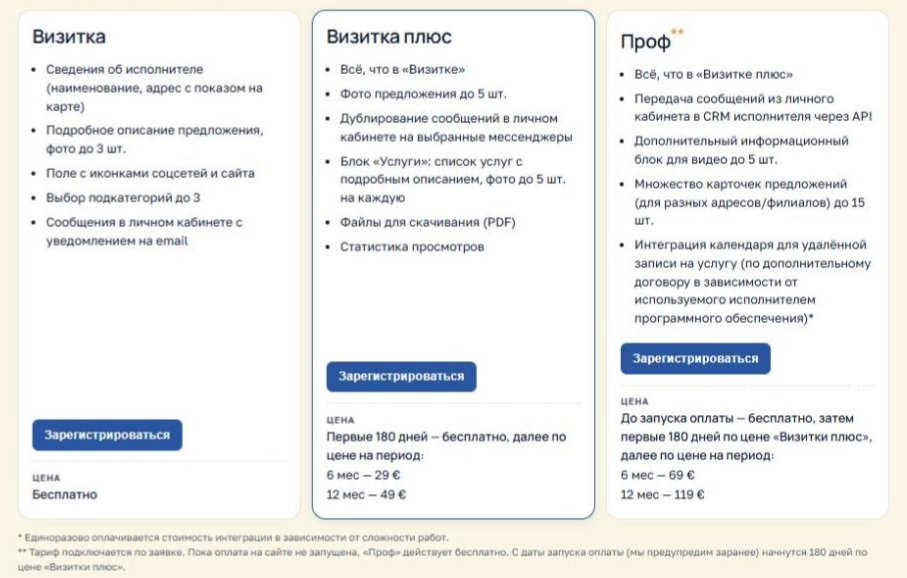
Each subsequent tariff includes everything that is in the previous one.
| Business card | Business card plus | Prof. | |
|---|---|---|---|
| Price | for free | First 180 days free, then €29 for 6 months or €49 for 12 months. | Free before the payment is launched; then the first 180 days at the price of "Business Card Plus", after that - €69 for 6 months or €119 for 12 months. |
| Proposals (activities) | 1 | 1 | up to 15, for example branches |
| Details about the contractor, address and map | Yes | Yes | Yes |
| Description of the offer | Yes | Yes | Yes |
| Photo of the proposal | up to 3 | up to 5 | up to 5 |
| Catalog subgroups | up to 3 | up to 3 | up to 3 |
| Website and social media icons | Yes | Yes | Yes |
| Customer Messages | in the office + email | + Telegram notifications | + transfer to your CRM |
| Services with descriptions, prices, and photos (up to 5 per service) | — | Yes | Yes |
| PDF files for download | — | up to 5 per offer | up to 5 per offer |
| View statistics | — | Yes | Yes |
| Video (YouTube or your own files) | — | — | up to 5 per offer |
| Service appointment calendar | — | — | under a separate agreement |
"Prof" integrations (appointment calendar) are connected by contract, and their setup is a one-time fee; the cost depends on the complexity of the work.
"Pro" is already operational. Everything except the recording calendar is available immediately after activation. The calendar depends on the program the performer uses and must be configured separately. You can upgrade to "Pro" by request—see Section 3.
2. 180 free days and what happens after
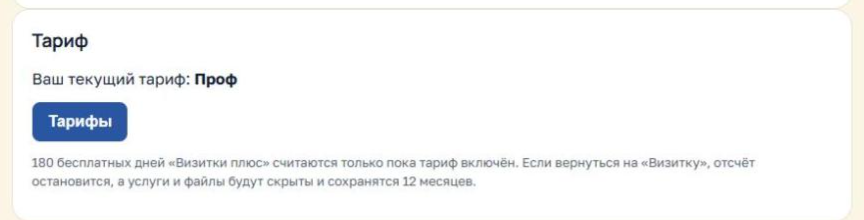
The first 180 days of "Business Card Plus" are free. The countdown starts from the day you upgrade to the plan. You can use the "Pro" plan for free until you launch the payment process on the website. From the payment launch date, which we will notify you of in advance, the 180 days will begin at the "Business Card Plus" price, and then at the "Pro" price. The time period is calculated separately for each paid plan.
How many days remain. In the "Contractor's Account," you can see how many days remain in the tariff section.
Warnings. 14, 7, and 1 day before the end of the free or paid period, the contractor will receive an email.
Pay in advance. Your paid term will begin immediately after your free term, so you can pay in advance—no days will be wasted.
If the term expires and payment is not made , the plan will automatically revert to the "Business Card" plan. Your card remains in the catalog, and everything above the "Business Card" plan is hidden but not deleted:
- services, PDF files and videos are stored for 12 months;
- On "Prof" extra offers are hidden - the one from which you switched to "Prof" or the one closest to the performer's address remains;
- Return your plan within 12 months, and everything will appear on the website again.
If you upgrade to Business Card voluntarily , it will happen immediately. Unused free days will remain in reserve: when you return to Business Card Plus, the countdown will resume where you left off. Money for the paid period is not refunded for a voluntary downgrade.

Didn't have time to pay? We don't throw anything away. The excess just gets put away on the mezzanine for 12 months—like my winter boots.
3. How to change your tariff
To "Business Card Plus." Open the "Prices" page from your dashboard or from the "How it works" section and click "Switch to a plan" in the "Business Card Plus" card. The plan will be activated immediately, and your 180 free days will begin from that day.
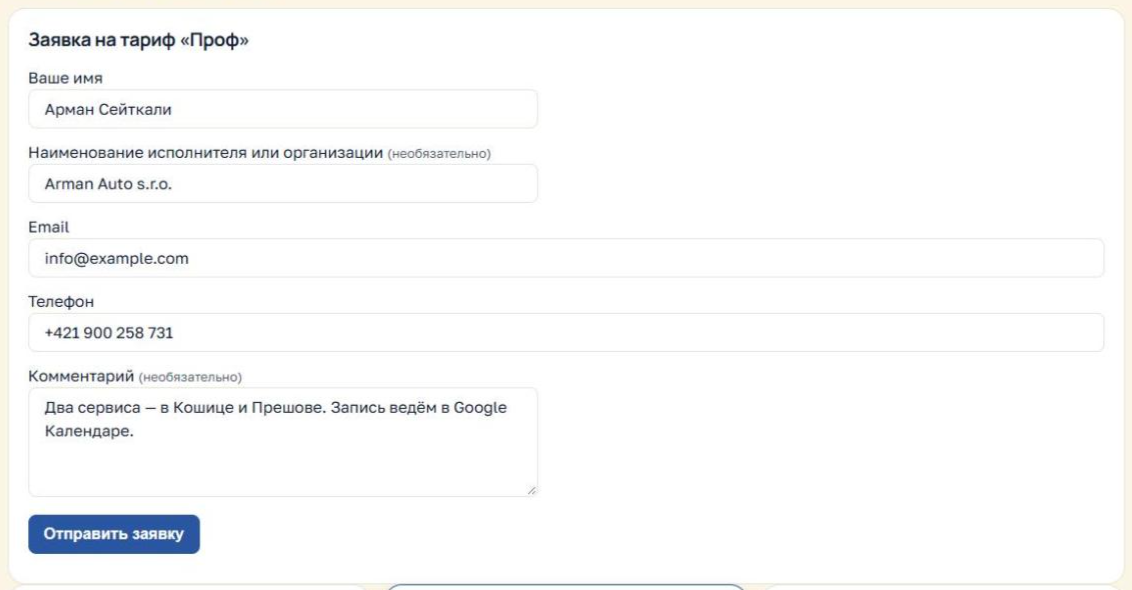
On "Prof." Click "Apply for a plan" and fill out a short form: name, product name, email, phone number, and a comment—for example, how many branches you have and what CRM you use. We'll contact you, discuss integrations, and manually activate your plan.
To "Business Card." Click "Switch to Plan" in the "Business Card" section. The downgrade occurs immediately. Details on what's hidden and how long it's stored are in Section 2.
On the rates page, your current rate is marked with the "Your current rate" button. Guests see the "Register" button.
4. Integration with CRM (Prof tariff)
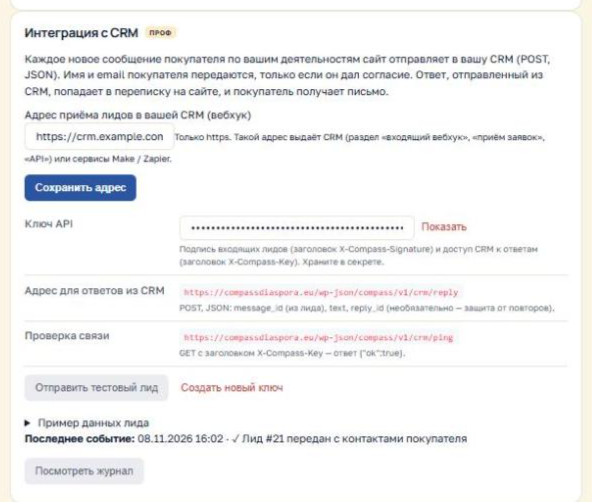
Customer messages can be automatically entered into your customer accounting system as leads, and a response sent from the CRM can be returned to the customer on the website. Compass enables the integration by contract, after which a "CRM Integration" section will appear in the "Contractor Account."
How to set up:
- In your CRM, find the address for receiving requests—it's called an "incoming webhook," "request reception," or "API." If your CRM doesn't have one, services like Make or Zapier will work.
- Paste this address into the "Lead receiving address in your CRM" field and click "Save address." The address must begin with https://.
- Click "Send Test Lead" and check that it appears in your CRM.
- To ensure that responses from your CRM are returned to your website, provide your CRM specialist with the API key and "Address for CRM responses" from the same section. Sample lead data is also included there.
What's sent to the CRM: offer title, message text, buyer's language, and a link to the conversation. The buyer's name and email address are only transmitted if they check the consent box below the message form.
Log. The block displays the most recent event, and the "View Log" button displays the last 20: which leads were transferred, with or without contacts, and whether there were any errors. If the CRM is temporarily unavailable, Compass will resend the message after 5 minutes, 30 minutes, 2 hours, and 12 hours. The message remains in your account in any case.
Keep your API key secret. If it falls into the wrong hands, click "Create a new key" and replace it in your CRM.

The client wrote—the request is already in your CRM. Even I can't unpack it that quickly.
5. Payment and frequently asked questions
How do I pay? Payment options will be available later, and we'll notify you in advance. Until then, paid features are free.
Can I try Business Card Plus and then return? Yes. You can switch back to Business Card at any time. Unused free days will be retained, and your services and files will be retained for 12 months.
What happens to reviews if I change my plan? Reviews and ratings are not affected by the plan and are always saved. The exception is hidden offers on "Prof": while an offer is hidden, its reviews are also not visible.
Is it possible to upgrade directly to the Pro plan, bypassing the Business Card Plus plan? Yes, by request. Pro plan is free until the payment launch, but afterward, the first 180 days cost the same as the Business Card Plus plan.
How much does calendar integration cost? It's a one-time setup fee, and the price depends on your program and the complexity of the work. We'll quote you after you submit your request.
Will there be advertising? Yes, paid advertising options will be available later: banners and top-of-list placement. We'll talk about them separately.
If you have any questions, click "Contact technical support" in your account or in the footer of the website.
Compass - your own are nearby.
На Компасе три тарифа исполнителя. «Визитка» бесплатна всегда, «Визитка плюс» первые 180 дней тоже бесплатна, «Проф» — для бизнеса с филиалами и своей CRM, подключается по заявке.
Сейчас оплаты на сайте ещё нет: платные возможности работают бесплатно. Когда оплата появится, мы заранее предупредим всех исполнителей.
Тарифы — как чемоданы: ручная кладь, обычный багаж и контейнер. Начни с ручной клади, она бесплатная.
1. Что входит в каждый тариф
Каждый следующий тариф включает всё, что есть в предыдущем.
| Визитка | Визитка плюс | Проф | |
|---|---|---|---|
| Цена | бесплатно | первые 180 дней бесплатно, затем 29 € за 6 мес. или 49 € за 12 мес. | до запуска оплаты — бесплатно; затем первые 180 дней по цене «Визитки плюс», после — 69 € за 6 мес. или 119 € за 12 мес. |
| Предложений (деятельностей) | 1 | 1 | до 15, например филиалы |
| Сведения об исполнителе, адрес и карта | да | да | да |
| Описание предложения | да | да | да |
| Фото предложения | до 3 | до 5 | до 5 |
| Подгруппы каталога | до 3 | до 3 | до 3 |
| Значки сайта и соцсетей | да | да | да |
| Сообщения покупателей | в кабинете + письмо на email | + уведомления в Telegram | + передача в вашу CRM |
| Услуги с описанием, ценой и фото (до 5 на услугу) | — | да | да |
| Файлы PDF для скачивания | — | до 5 на предложение | до 5 на предложение |
| Статистика просмотров | — | да | да |
| Видео (YouTube или свои файлы) | — | — | до 5 на предложение |
| Календарь записи на услугу | — | — | по отдельному договору |
Интеграции «Проф» (календарь записи) подключаются по договору, их настройка оплачивается один раз — стоимость зависит от сложности работ.
«Проф» уже работает. Всё, кроме календаря записи, доступно сразу после подключения. Календарь зависит от программы, которой пользуется исполнитель, поэтому настраивается отдельно. Перейти на «Проф» можно по заявке — см. раздел 3.
2. 180 бесплатных дней и что будет после
Первые 180 дней «Визитки плюс» бесплатны. Отсчёт идёт с того дня, когда вы перешли на тариф. На «Проф» до запуска оплаты на сайте пользоваться тарифом можно бесплатно. С даты запуска оплаты, о которой мы предупредим заранее, начнутся 180 дней по цене «Визитки плюс», а затем — по цене «Проф». Сроки считаются отдельно для каждого платного тарифа.
Сколько осталось. В «Кабинете исполнителя» в блоке тарифа видно, сколько дней осталось.
Предупреждения. За 14, 7 и 1 день до конца бесплатного или оплаченного срока на email исполнителя придёт письмо.
Оплата заранее. Оплаченный срок начнётся сразу после бесплатного, поэтому платить можно заранее — ни один день не пропадёт.
Если срок закончился, а оплаты нет, тариф автоматически вернётся на «Визитку». Ваша карточка остаётся в каталоге, а всё, что сверх «Визитки», скрывается, но не удаляется:
- услуги, PDF-файлы и видео хранятся 12 месяцев;
- на «Проф» лишние предложения скрываются — остаётся то, с которого вы переходили на «Проф», или ближайшее к адресу исполнителя;
- вернёте тариф в течение 12 месяцев — всё снова появится на сайте.
Если вы перейдёте на «Визитку» сами, это произойдёт сразу. Неиспользованные бесплатные дни останутся в запасе: при возвращении на «Визитку плюс» отсчёт продолжится с того места, где остановился. Деньги за оплаченный период при добровольном понижении не возвращаются.
Не успел оплатить? Ничего не выбрасываем. Лишнее просто убираем на антресоль на 12 месяцев — как мои зимние ботинки.
3. Как сменить тариф
На «Визитку плюс». Откройте страницу «Тарифы» из кабинета или из раздела «Как это работает» и нажмите «Перейти на тариф» в карточке «Визитки плюс». Тариф включится сразу, с этого дня пойдёт отсчёт 180 бесплатных дней.
На «Проф». Нажмите «Подать заявку на тариф» и заполните короткую форму: имя, наименование, email, телефон и комментарий — например, сколько у вас филиалов и какая CRM. Мы свяжемся с вами, обсудим интеграции и включим тариф вручную.
На «Визитку». Нажмите «Перейти на тариф» в карточке «Визитки». Понижение происходит сразу, что при этом скрывается и сколько хранится — в разделе 2.
На странице тарифов ваш нынешний тариф отмечен кнопкой «Ваш текущий тариф». Гости видят кнопку «Зарегистрироваться».
4. Интеграция с CRM (тариф «Проф»)
Сообщения покупателей могут автоматически попадать в вашу систему учёта клиентов как лиды, а ответ, отправленный из CRM, — возвращаться покупателю на сайт. Интеграцию включает Компас по договору, после этого в «Кабинете исполнителя» появится блок «Интеграция с CRM».
Как настроить:
- В вашей CRM найдите адрес для приёма заявок — он называется «входящий вебхук», «приём заявок» или «API». Если в CRM такого нет, подойдут сервисы Make или Zapier.
- Вставьте этот адрес в поле «Адрес приёма лидов в вашей CRM» и нажмите «Сохранить адрес». Адрес должен начинаться с https://.
- Нажмите «Отправить тестовый лид» и проверьте, что он появился в CRM.
- Чтобы ответы из CRM возвращались на сайт, передайте вашему специалисту по CRM ключ API и «Адрес для ответов из CRM» из того же блока. Там же есть пример данных лида.
Что приходит в CRM: название предложения, текст сообщения, язык покупателя и ссылка на переписку. Имя и email покупателя передаются, только если он поставил галочку согласия под формой сообщения.
Журнал. В блоке видно последнее событие, а по кнопке «Посмотреть журнал» — 20 последних: какие лиды переданы, с контактами или без, и были ли ошибки. Если CRM временно недоступна, Компас повторит отправку через 5 минут, 30 минут, 2 часа и 12 часов. Сообщение в любом случае остаётся в кабинете.
Ключ API храните в секрете. Если он мог попасть в чужие руки, нажмите «Создать новый ключ» и замените его в CRM.
Клиент написал — заявка уже в твоей CRM. Даже я так быстро не распаковываюсь.
5. Оплата и частые вопросы
Как платить? Оплата появится позже, о её запуске мы предупредим заранее. До этого платные возможности работают бесплатно.
Можно ли попробовать «Визитку плюс» и вернуться? Да. Вернуться на «Визитку» можно в любой момент. Неиспользованные бесплатные дни сохранятся, а услуги и файлы — 12 месяцев.
Что будет с отзывами при смене тарифа? Отзывы и оценки не зависят от тарифа и сохраняются всегда. Исключение — скрытые предложения на «Проф»: пока предложение скрыто, его отзывы тоже не видны.
Можно ли перейти сразу на «Проф», минуя «Визитку плюс»? Да, по заявке. До запуска оплаты «Проф» бесплатен, а после — первые 180 дней стоит как «Визитка плюс».
Сколько стоит интеграция с календарём? Настройка оплачивается один раз, цена зависит от вашей программы и сложности работ. Её назовём после заявки.
Будет ли реклама? Да, позже появятся платные рекламные возможности: баннеры и показ в начале списка. О них расскажем отдельно.
Остались вопросы — нажмите «Написать в техподдержку» в кабинете или в подвале сайта.
Компас — свои рядом.